
You can play Minecraft in your web browser without downloading anything. Compatible with Chrome, Opera, Mozilla Firefox, Edge, and others, Mojang released "Minecraft Classic" to celebrate the mining and block-building franchise's 10th anniversary, preserving the game as it was in 2009. It is complete, even with the same bugs.
Poki makes Minecraft Classic available to play on its website, where both players who follow its expansions and updates and those who are new to the game can try it for free. It is certainly very different from the current version, as well as from what may come in the future, such as augmented reality. Expect only classic, basic features, including an interface that evokes the game's launch and a limit of 32 types of building blocks.
"The Minecraft of 2009 is even more glorious than we remembered!" Mojang's Tom Stone wrote in the announcement.
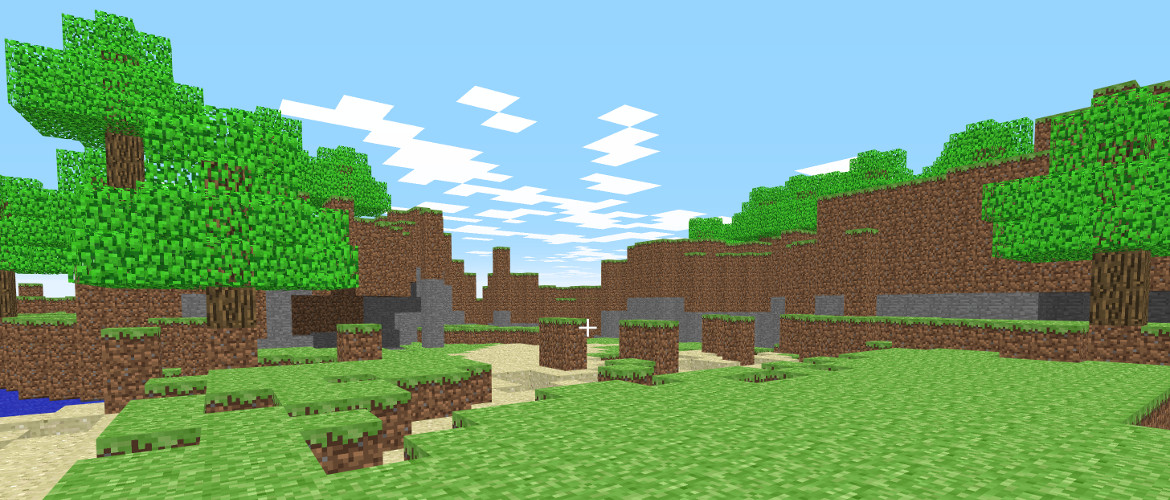
Minecraft Classic for browsers.
In this version, you can share links with friends to play online with up to nine other people, and it can run in any browser that supports WebGL or WebRTC. That means almost any popular, up-to-date browser is compatible.
The game's developer said it was preparing an exhibition about the game for Seattle's Museum of Pop Culture, along with other additions. This free classic version is not Microsoft's only idea for celebrating 10 years of Minecraft, which had reached 74 million players worldwide at the time.
How to Play Minecraft Classic
You can use the W, A, S, and D keys to move, and the mouse to interact directly with blocks and control the camera. Unlike the final version of Minecraft, the left mouse button is used both to destroy and add blocks. You therefore need to use the right mouse button to switch between the two functions. Players can also press the number keys from 1 to 9 to choose among the available block presets, or press B to open a menu with even more blocks to choose from.
Simply enter your nickname, and you are ready to play.